Tuesday, June 2, 2009

I ♥ Faces - Week 21 Entry

Well I didn't enter in last weeks competition, silhouettes, mostly because I didn't have any silhouettes already, and didn't have time to shoot any. But I'm back this weeks for birthday week and the special pets category!

For the kids birthday, here is Mr. SL on his first birthday. He wasn't so sure about his cake at first, but in the end, he gobbled it up and begged for more. He is glancing over to his dad in this picture who is telling him to eat it. I love the face he is making, kinda a "are you sure about this stuff?"


And for the pets entry, here is Zoe, my boyfriend's family's Maltese. This was at the alumni lacrosse game a few weeks ago. It was cold and rainy, and well, when you only weight 3 lbs. and your mom shaved all your fur off, you get a little chilly.


Be sure to head on over to I ♥ Faces to check out all the awesome entries and maybe even enter your own! Oh and I can't be the only one who is dying to know the results of the blurb book contest! Seriously Amy and Angie, let's move it! Not that I really think I won, or even made into the book, I'm just dying to see the beautiful faces that did!

Monday, May 25, 2009

Blurry Backgrounds for GIMP

Today I learned how to make blurry backgrounds after the picture has been taken. I know how to adjust my aperture already, but there are time where I forget to adjust it or it's not as low as I would like. So learning how to do this was really handy. It's also great for those of you who have point and shoot cameras and want to make your pictures look like the pros.

I'm going to show you how to do it in GIMP. Why? Well because it is slightly different that Elements and also I thought there may be some people out there who don't have Elements and want to try it. It's also free, saving you money you may not have to spend. But I do really recommend Elements!!!

Here are your step-by-step instructions.

Step 1: Go read MckMama's post about blurry backgrounds! It's amazing and 100% credit goes to her.

Step 2: You better have read that post! The whole thing!

Step 3: Download GIMP.

Here is the picture I'll be using. Cute picture but the bushes are much sharper than I would prefer.


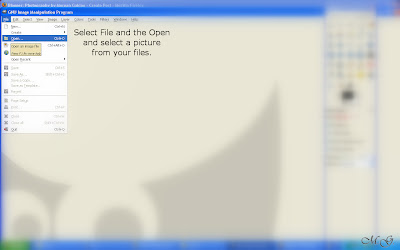
Step 4: Open up GIMP and open the picture you want to work on. Do this by going to file and open and then choosing your file.


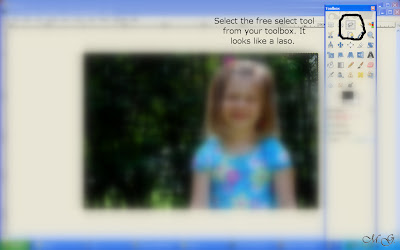
Step 5: Now with your picture open, select the free select tool from your toolbox. It looks like a lasso. (Yes I'm aware I'm missing an "s" in my screen shot. I'm just too lazy to go back and fix it.)


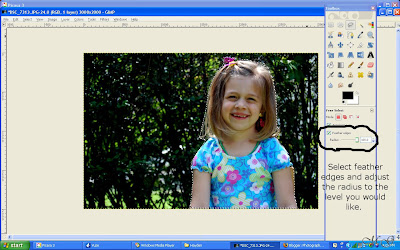
Step 6: Now adjust your feather edges and outline the area you would like to keep sharp. This can take a little bit of practice. Do keep it as close to the object/person/area you want to keep sharp as possible. It will be quite obvious if you don't and won't look that good.


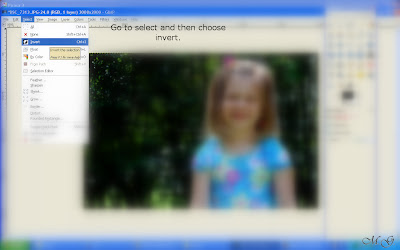
Step 7: Once the area is selected, go to select and then invert and click invert.


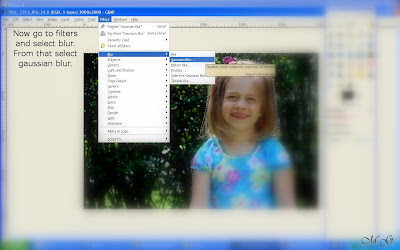
Step 8: Now you are all ready for the fun part, the blurring! Woohoo! Go to filters and then blur and select Gaussian blur.


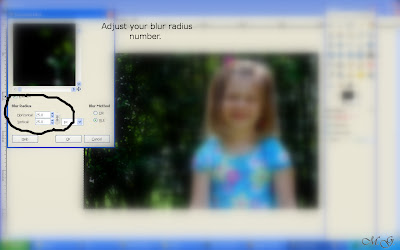
Step 9: Almost there. Now set your blur radius levels. It takes a little bit of trial and error to find what you like for each picture, so just play around with it.

Step 10: Now wait a second for it to make the adjustments. You'll see it happen. It you like what you see, save it and move on. If not, try again until you get what you like.
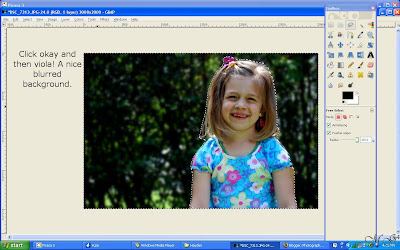


Step 11: Sit back and admire your work!


Step 12: Make sure you write a big thank you to MckMama (not me!) when your done!

Happy Editing!

Friday, May 22, 2009

Holly Go Lightly

My dog got groomed on Wednesday! She looked so cute and fluffy, I just had to take some pictures. She is a 9 year old Jade Mist Shetland Sheepdog. She isn't the easiest thing to shoot, as she tends to ignore you when you call her name, I'm pretty sure the cat is easier.


Tuesday, May 19, 2009

Week 19 I ♥ Faces Entry

Over at I Faces it's their Blurb Book contest week. Basically you are entering, in either the amateur or professional category, your best "face" pictures. Amy and Angie (co-founders) will pick a winner from each category and their will be one "reader's choice" winner. All three of these winners will be featured in their book and receive a free copy of the book. Anyone else who is chosen to be featured in the book will receive credit for their photo as well as 10% of the purchase of the book. Cool, no?

I'm entering in the amateur category since I don't really get paid for my work, and haven't really been at this that long. I actually chose one of the first photos I took, so I really was an amateur when I took it. It's one of my old favorites, you just can't get over those deep blue eyes.

Head on over and check out my competition, or if you feeling up to the challenge, enter a photo yourself. But hurry, you only have till 9 p.m. tonight (5/19). Good luck!


"I am submitting this photo into the www.iheartfaces.com Blurb Book photo contest. I am granting I Faces permission to use my photo in a printed version of a book for commercial use and possibly advertising of a photo book on both the Blurb and I Faces web sites."


Monday, May 18, 2009

Alumni Lacrosse Game

Saturday was the alumni lacrosse game for FCA/CHEN. It's always lots of fun to watch, and the boys always seem to have lots of fun. Of course the weather was absolutely miserable, but I'm pretty sure the guys didn't notice.


Here is the video of all the pictures


And a few pictures. For the rest, visit my SmugMug site.


Praying before the game.


Bench warming, it was really cold.


Fight for the ball...


Brother against brother.


Note: Any use of these pictures, whether personal or commercial, without my permission is a violation of the copyright laws. This includes simply copying and saving them to your computer. Please contact me if you would like to purchase copies.

Thursday, May 14, 2009

Pretty, Pretty, Princess

So as I was posting yesterday, E came downstairs to announce to me that her CD player had turned off. I noticed that she was wearing quite a fashion statement. I told her I wanted to take her picture, but while I finished yesterday's post, she went upstairs and changed (again!). Oh well, I still took her pictures. The outfit and accessories are all her own.


Wednesday, May 13, 2009

Underage Drinking...

So today apparently was "let's be a grump and unphotogenic" day, and I missed the memo. SL could have cared less that I was trying to take his picture and did not find any of the ridiculous things I was doing interesting at all. So the result was lots of photos taken, and none that were all that great. Oh well, there is always tomorrow.


While I was fixing lunch though, I caught SL doing some underage "drinking." I think it's time to move the alcohol to a higher shelf.